Newest Post
Showing posts with label tutorials. Show all posts

- When coloring hair. ima use brush tool. with small tip ,and dont forget to use double rounded or single brush when makes pony hair. and for makes more realistic use pen tool and put litle lines on the side of hair, use imagination. like k dash hair was flowing with wind . . .

- first ima create base skeleton lines pose. without skeleton, proportion should be worse.
- makes cloth and jeans. its my old draw, xD. . .
- draw and draw.. coz drawing is fun... cmon ^^b
Tag :// tutorials
Basic Information
When we wanna to drawing a tuxedo blazer, cloth, casual shirt, or jeans blazer for man we need to learn first how to create stright lines, and for me is good to training first create 2 dot , conected that 2 dots with stright lines first. and each times we makes lines. make sure that lines is connected perfecly. and dont forget , feel your hand relax when drawing something.
Basic Knowladge
Theres so many option for us when we wanna to drawing something, many expert artist use their own imagination ,and some of them still use reference ,so dont worry about it, maybe from the internet or from real life situation. on the internet we can search easily on the google maybe, post it on paint tool sai. makes new layer. and use pencil tool. and start to draw, if you are an expert and wanna to explore your imagination, we can train drawing step with makes dots and lines, and the focus here was how to create shirt for a man. actualy im not study on desiner cloth or a shirt. but i'm seing many style from famous manga and anime titles, drawing is FUN :) , keep train and love your arts :)
Reference
Maybe blazer first, coz this typical stylish shirt is very famous now ,i c many korean boy band like to wear this kind.
This some kind of maybe cool blazer. i think.


as you can c, on that references, when we drawing blazer. on the not a fat body. usualy use alot of stright lines. accept on the specific places
......................now loading.............................
:D
:D
Tag :// tutorials


Dedicated for ashley bby <3
I wanna draw a female, but didnt know why be a boy xD~
But anyway iv got ispiration drawing this from music escape the fate * ashley. they was a awesome freaky band \m/ yeah !!!
Tag :// tutorials
T ara Park Ji Yeon
Basic drawing :
1. Same like others
2. we must create the layer first with real pictures on Park Ji Yeon
3. Create another layer and dont forget turn real pictures with multiply .
4. drawing face first. with pen tool
5. on hair use brush and curtom brush , change seting brush to rouded 1 and rounded 2 , create lines carefully.. relax ur hand... :3
6. watch the video..! :D <3 ^^
6. watch the video..! :D <3 ^^
Tag :// tutorials
Video Drawing Tyki Mikk D~ gray- Man Enemy Alen wallker
ON that tutorial .
Ima give litle tips how to draw cloth and buttom easier use, template so we not manualy create the flower patern. other than this techique , we can use custom brush on photoshop.. but ima not mastering it... > < to complex...... lazyy........
happy drawing guys.. girlz..^^b arigato...~
Ima give litle tips how to draw cloth and buttom easier use, template so we not manualy create the flower patern. other than this techique , we can use custom brush on photoshop.. but ima not mastering it... > < to complex...... lazyy........
happy drawing guys.. girlz..^^b arigato...~
Tag :// tutorials
Tag :// tutorials
step on this video was .
1. ima use real pictures.
2. makes new layer
3. turn real pictures to multiply to easier see the background
4. new layer and use imagination to draw line art
5. happy draw ^^b
Ow ya for makes Stringten Lines on Paint tool sai. just simply press or hold SHIFT key on keyboard right click . easy makes line stright. , FOCUS ^_^b
arigato...^_^b
Tag :// tutorials
 | |
| real pictures |
 | ||
| basic painting |
 | |
| potrait small lips |


Video Tutorial on youtube
part 1
part 2
Basically this drawing scene is was. :
1. i follow the line of real picres
2. i pick up real base color and makes new layer , and draw it using paint tool brush tool etc .
3.try to added shading on skin where the theres no sun spot over the skin ,.
4. adding sun spot on the skin hair lips, hair , and eyes. to look brighly
5. ima resize the volume of iconiq lips..> < its look sexier when she have small lips..
6. happy drawing.. ^^ wait my second tutorial of this scene on youtube . thankyou..
7. merry crismast and happy new year...^^b
Tag :// tutorials
well, on this tutorial ima tell guide tips to draw sadnes males CRY. ^^ litle explanation. :)
start.. draw hair
start.. draw hair
 | ||||
| hair |
 | |
| sad expretion |
this pictures not finish yet.. lazy. ^^
Tag :// tutorials
 |
| texture for pant |
 | |
| texture for cloth |
- step 1 . use our line art's
- step 2 custom layer with multiply with this we can see the background layer.
- step 3. resize and group the texture, and erase the texture , use oil water tool to makes all textures layer blended.
 |
| coloring pant |
- if you want makes shadow, use darken color , on this pant we can use dark orange layer color.
 | ||||
| cloth with black white texture |
- makes new layer and paste the texture on it. use multiply layer properties, and dunt forget to erase litle bit the textures , trough, reduce opasity to 83% to makes the texture look not to dark. its litle grey.
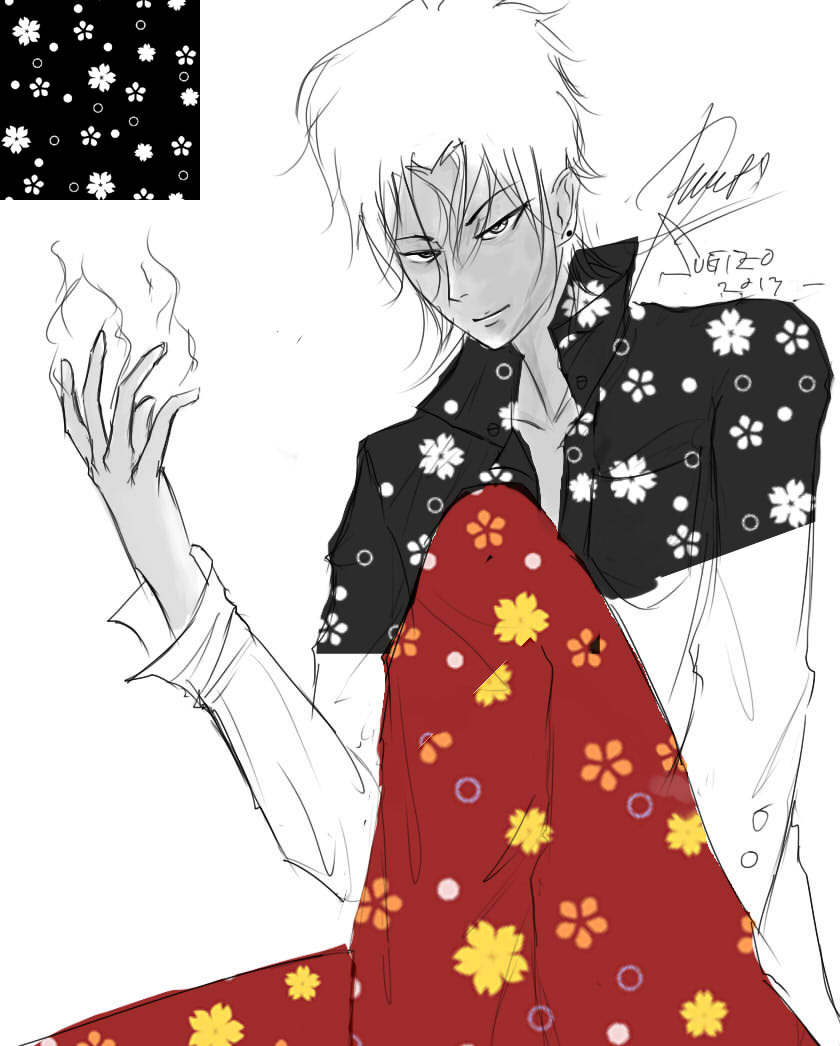
- put on the diferent layer first , resize it, erase it.. and blend it using tool oil and water. we need minumum maybe 2 or 5 flower textures to makes all cloth fill complete ,

 | |
| erase it |
 |
| finish with no shading |

- With Previously tutorial and this tutorial tips. shading makes cloth look litle more realistic.
Tag :// tutorials
 |
| layer 1 |
 |
| layer 2 |
 | |
| layer 3 |
 |
| layer 4 |
 |
| layer 5 |
 |
| layer 6 |
 |
| layer 7 |
 |
| layer 8 |
 |
| layer finish |
 |
| layer 9 |
- layer 1 : We can use selection tool . to select what area we want to chose , makes new layer and select brush tool . select grey collor and brush it. change the layer properties with multiply
- layer 2 : same but activate layer clip by check it first. chose grey color and select darken from grey before , or use brighnest tool to makes color more darken. n brush it again.change the layer properties with multiply
- layer 3 :coloring the cloth with red color. im using 2 layer red color and merge it become one.its look darken, red.change the layer properties with multiply
- layer 4 : coloring the cloth with masking tool by check the layer clip and coloring it with darken red color to makes shadow shading. on position same with out line art and dunt forget change the layer properties with multiply
- layer 5 : makes cloth look shiny with red color, dont forget to change layer properties with addition.
- layer 6 : same with cloth. but diferent color only.
- layer 7 makes shading on pant by using selection tool area. and put darken color again on it.
- layer 8 : coloring it with yellow
- layer 9 : addition layer properties and coloring it hair with glowing yellow and
- layer 10 : chose grey collor and makes shiny on nose and check tyki mikk. look glowing litle bit . ^^ .. tara...
- if wanna makes background maybe on photoshop. with many option of brush tool there. its quite cool i think :) ,, thx ^^
Tag :// tutorials
When we want to draw scene on manga, we need exacly to know where the point of view angle camera position is, usualy main character have more detail than others, Coz when we build character development , we must mastering expresion , deformation, angle camera position, have many reference to makes ( cloth , armor ) and anythink else to makes our manga, eye catching. its still hard for me.. xD... but keep works ^^
 |
| main have detail and near of camera |
Look On the uper pictures the main character was sit down on the chair, and the second was walk behind. i makes the concept first both of that character. but if you can, we can draw trough to the paper. :)
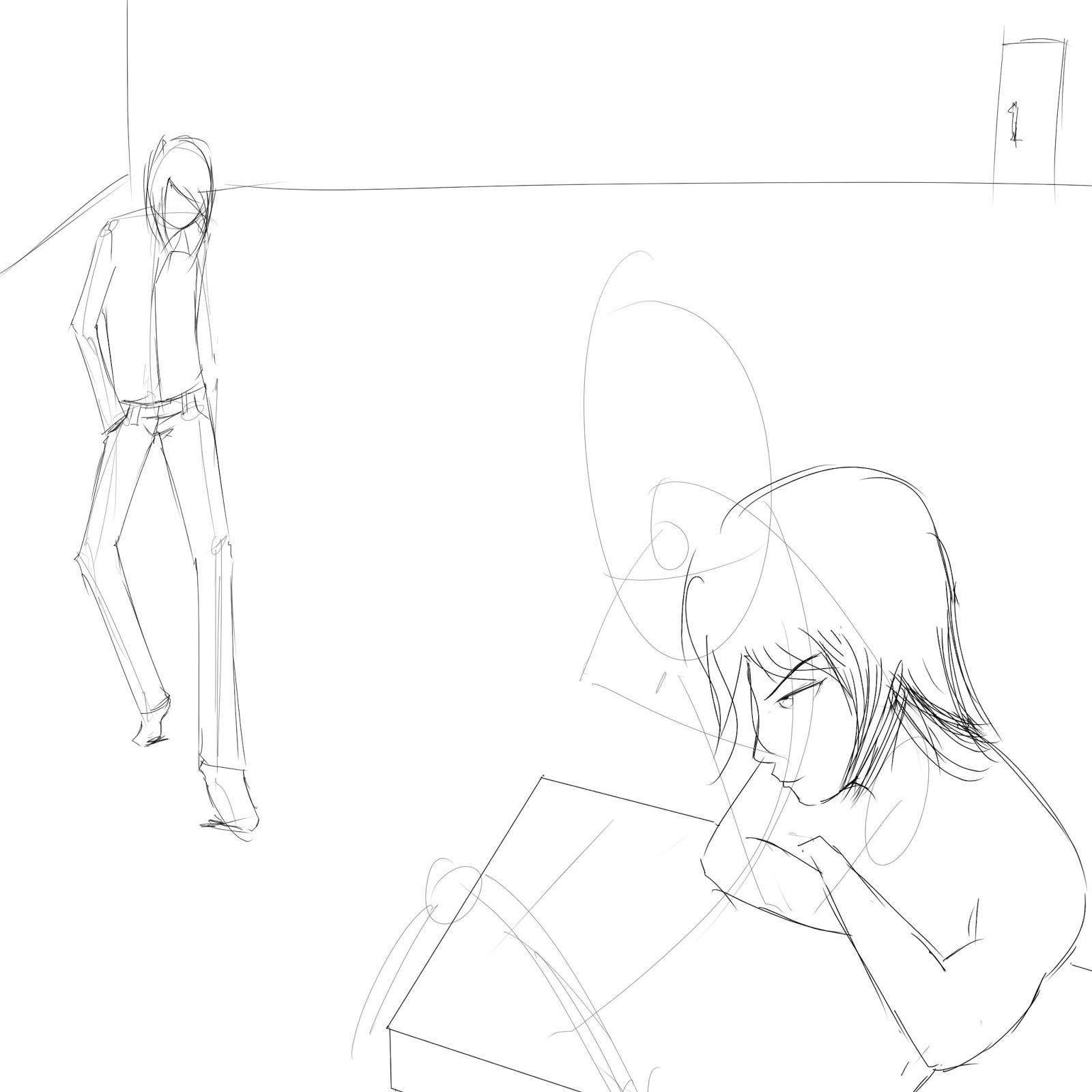 |
| makes wall on the behind scene |
The Second Character Was walking, dont makes to much detail on it, its reduce spend times when we draw alot of slide manga.

Get Near Of The Camera biger, far away Smaler and not have many detail. on my sampe the position of the camera was on the center. use our imagination XD, and dunt forget always practice.. ^^
 |
| concept first |
 |
| half of final finish^^ |
Tag :// tutorials
 |
| Cero Idiot Neko xD |
 |
| Cero using cool hat XD |
- First I draw. the 1 eyes first. Use Pencil tool.. dunt forget to makes concept first . oval lines.
- After that select selection tool lasso tool on our eyes.. ctrl + c and ctrl + v , tara.. another eyes come on different layer, select layer -> hirzontal flip. on new layer eyes. rotate and deform cat eyes until look nice. move position , resize or anything else to makes our cat look yummy :3
- Then makes ear . both.. added some hair with pencil tool. ima makes 2 ponny on my cat xD~ , hand also if we're lazzy makes just copy paste n reform it.. we got another hand :3 with same proportion, it such like miroring our drawing object. happy drawing. ^^b
Tag :// tutorials
What we need before makes Perfect Lines is Concept Proportion and do it.
Without Concept imposible we can makes and imagine our character. exept . we're already pro on drawing manga. that was another case :3,
my inspiration create this character from saito hajime , ( rurouni kenshin), and Ishida uryu Quincy ( bleach ) skiny body, smoking , and sharp eyes. ^^, lazzy to coloring it. xDD
 |
| Concept First |
 |
| Line arts then. |
 |
| Jhon Lenon with samurai xDD |
Without Concept imposible we can makes and imagine our character. exept . we're already pro on drawing manga. that was another case :3,
my inspiration create this character from saito hajime , ( rurouni kenshin), and Ishida uryu Quincy ( bleach ) skiny body, smoking , and sharp eyes. ^^, lazzy to coloring it. xDD
Tag :// tutorials
Cloth ver 0.001
When we designing and creating Object from Cloth theres such basic knowledge to Draw it, therefore some basic are:
- Cloth have different characteristics, depend on the type and thickness . commonly types of the Cloth who have more thicker is hardly to folded , Example Woll,leather jacket , jeans, etc.. its have really though material. i said ' hard type '
- Types hard cloth when folded . have folded lines ,cummonly is diagonal lines or just a vertikal lines. On the spesific Spot, usually rare find jacket have grooved lines. ok.
- While looking Cloth that who have a thinner thickness is easily folded, This type Cloth Commonly is silk or cotton, this types more frequently in use for design a T-shirt, and more hardly to draw it. we must mastering this type of cloth,.. when we can makes this.. its easily makes another type of the cloth.. :3 i said this type with ' soft type '
- At the Moment, soft type cloth. Should be have more dynamic groved lines. especialy when we draw character when have skiny body who put on a skirt oversized shirt, we'll see difference between both. soft type if influenced with gravitational forces and wind it will
flewed, and the hard type . is no. though. and i fink this type is cooler when males dress it. :D
Long times a go, old arts :3, when im use genius pen tablet. , its hardly to draw there lol.. get to know the style here mm.. imagination from K dash. KOF character.. im fan of him xD, he has though personality. and cummonly cool person is good to wearing jacket i think :
 |
| Jacket and jeans male ( Sugizho Dash ;) ) |
as you can see. if we draw jacket with many groved lines. its look not like jacket. and ones again if we can, use fabric texture on photoshop or photoshop lines , for makes it more natural.
 |
| Jacket Male |
 |
| Thickness long jacket type ' |
Look on that pictures. im put wrong and to less groved lines on it., we can place with color or sketch more on the path what we want look folded or with another technique just blur it, some designer or colored say shading technique, but on 2d lines arts is manual groved lines, the poin here , is where we need to put on the lines on the right path. ow ya one again. if we can makes lines groved correctly. the process of coloration its easier.

 |
| litle folded lines |
 |
| another method put the lines |

we put to much or less shading its must be look weird .=.= . Key here is ima change the out lines, depending where the spot are often folded, such in the shoulder, collar, groin. and if she was a girl, on chest boobs :3 and many much more. , if you can makes outline with contour dynamic drop down efectively not stright .. thats it ,, put iner folded lines there. . with makes good folded lines on iner and outlines we can makes shading look easier, and commonly CG artist put iner lines with darker than base color, i think japanese anime and manga style dont needed that to much.. japanese CG artis makes coloring and line arts , very simple. and dont need to much shading, many of them focus on smoth vector line arts. some of my previous tutorial. said that if we use vector line arts is easier when we coloring it. same like here. if we put the folded lines perfecly.. our arts will fortunately look cool.. :3, best spot folded lines arts,
=========================================================================
Tag :// tutorials


